> For the complete documentation index, see [llms.txt](https://docs.ineom-tsel.mit.id/llms.txt). Markdown versions of documentation pages are available by appending `.md` to page URLs; this page is available as [Markdown](https://docs.ineom-tsel.mit.id/manda/update-center/site/show-history.md). Agents can also search and read this documentation through its [MCP server](https://docs.ineom-tsel.mit.id/~gitbook/mcp).

# Show History

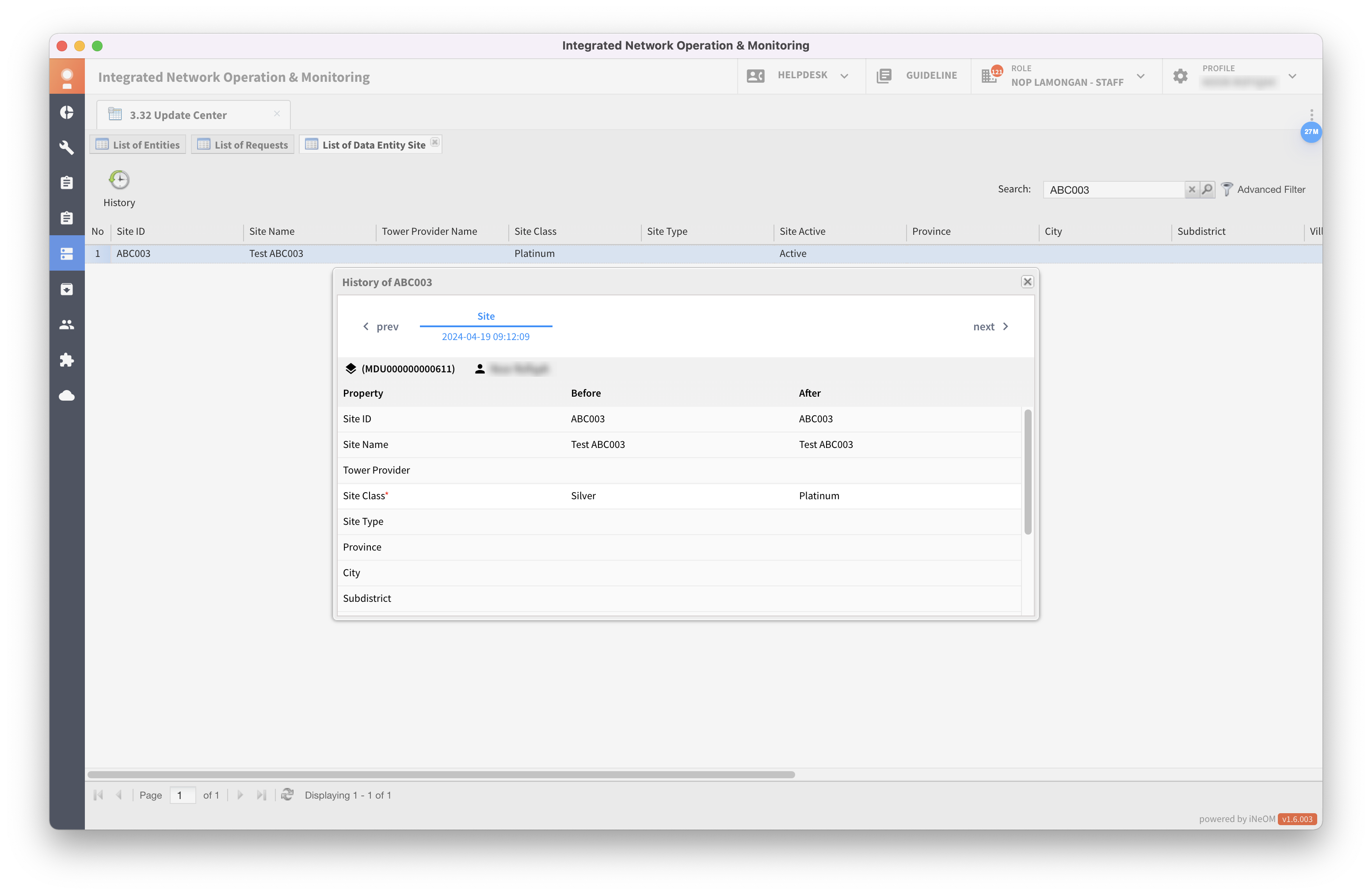
Proses menampilkan history:

1. Klik menu 3.32 Update Center (Manda Features).
2. Klik ikon 👁 pada entities Site.

<div><figure><img src="https://881216119-files.gitbook.io/~/files/v0/b/gitbook-x-prod.appspot.com/o/spaces%2F-MWVBMvffYxbmZPOUuP_%2Fuploads%2FMxfFshdOL16Hf5q5q3TW%2FUpdate%20Center%20-%20Show%20History%2001.png?alt=media&amp;token=62b5dbf8-1186-4f2a-98da-989abaa0da0d" alt=""><figcaption></figcaption></figure> <figure><img src="https://881216119-files.gitbook.io/~/files/v0/b/gitbook-x-prod.appspot.com/o/spaces%2F-MWVBMvffYxbmZPOUuP_%2Fuploads%2F1reiuT8qR4ngniK43TQC%2FUpdate%20Center%20-%20Show%20History%2002.png?alt=media&amp;token=dd957d3b-7520-48c5-b85f-32ada75076ce" alt=""><figcaption></figcaption></figure></div>

3. Cari site ID.
4. Klik site ID.
5. Klik tombol **`History`**.

<div><figure><img src="https://881216119-files.gitbook.io/~/files/v0/b/gitbook-x-prod.appspot.com/o/spaces%2F-MWVBMvffYxbmZPOUuP_%2Fuploads%2FLv6iOFGRQ57gHY4xn0tp%2FUpdate%20Center%20-%20Show%20History%2003.png?alt=media&amp;token=c1a96b8f-2c9c-4671-973f-30bfa30d5b99" alt=""><figcaption></figcaption></figure> <figure><img src="https://881216119-files.gitbook.io/~/files/v0/b/gitbook-x-prod.appspot.com/o/spaces%2F-MWVBMvffYxbmZPOUuP_%2Fuploads%2FlkQZn2P6NZJBD2BbW489%2FUpdate%20Center%20-%20Show%20History%2004.png?alt=media&amp;token=1675a049-bc7b-464e-b2b0-a5a3d6295512" alt=""><figcaption></figcaption></figure></div>