> For the complete documentation index, see [llms.txt](https://docs.ineom-tsel.mit.id/llms.txt). Markdown versions of documentation pages are available by appending `.md` to page URLs; this page is available as [Markdown](https://docs.ineom-tsel.mit.id/etsa/license/approval-delivery.md).
# Approval Delivery
{% hint style="warning" %}
Approval delivery oleh Requestor dilakukan pada tiket dengan status Information: **Delivered** - Action Next: **Waiting Approval Delivery**.
{% endhint %}
{% tabs %}
{% tab title="Accept" %}
Proses accept approval delivery:
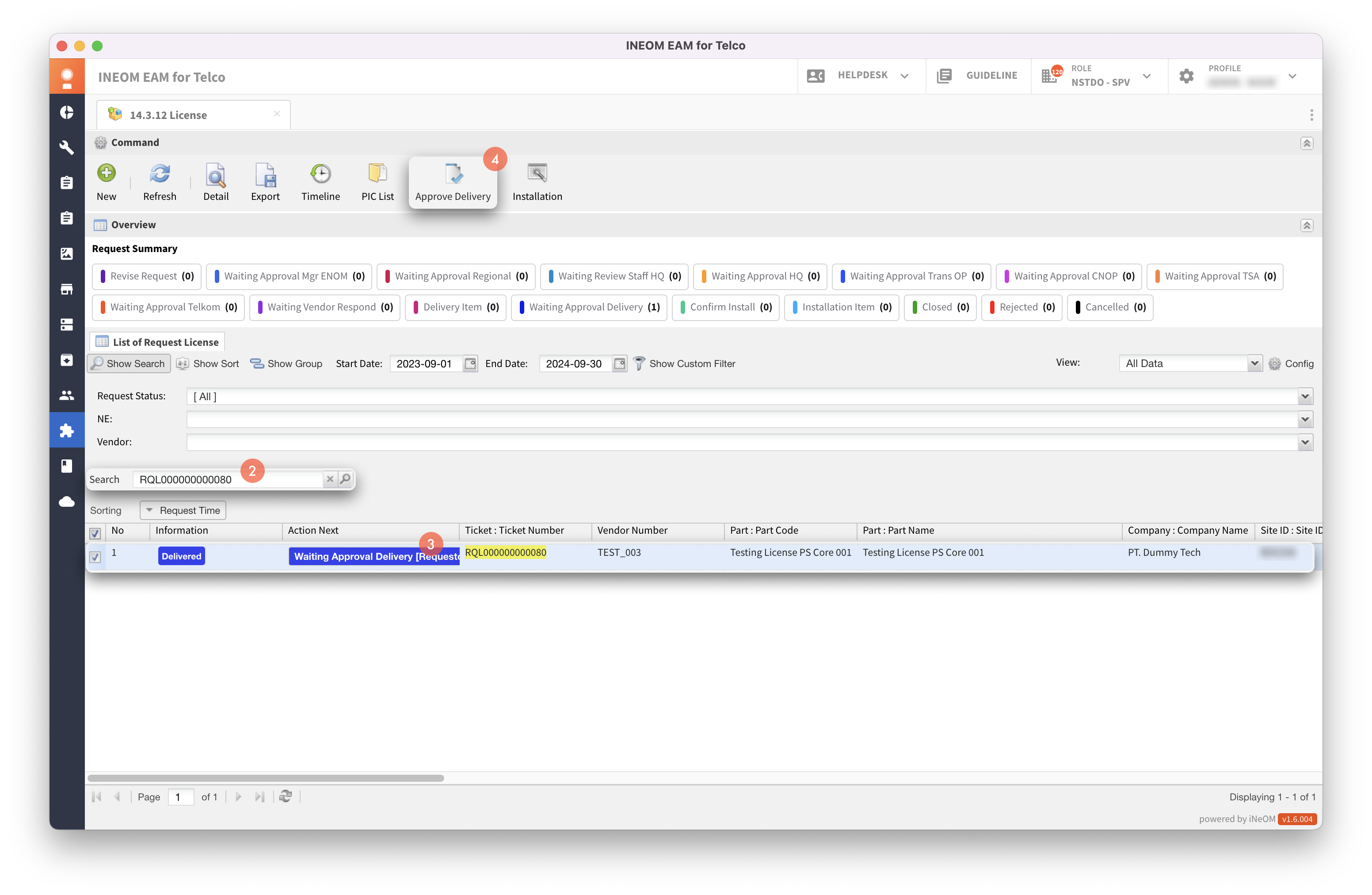
1. Klik menu 14.3.12 License (eTSA Features).
2. Cari ticket number RQL.
3. Klik tiket.
4. Klik tombol **`Approve Delivery`**.
5. Klik radio button Accept.
6. Klik tombol **`Submit`**.
{% hint style="success" %}
Proses accept approval delivery oleh Requestor berhasil apabila status tiket menjadi **Closed**.
{% endhint %}
{% endtab %}
{% tab title="Reject" %}
Proses reject approval delivery:
1. Klik menu 14.3.12 License (eTSA Features).
2. Cari ticket number RQL.
3. Klik tiket.
4. Klik tombol **`Approve Delivery`**.
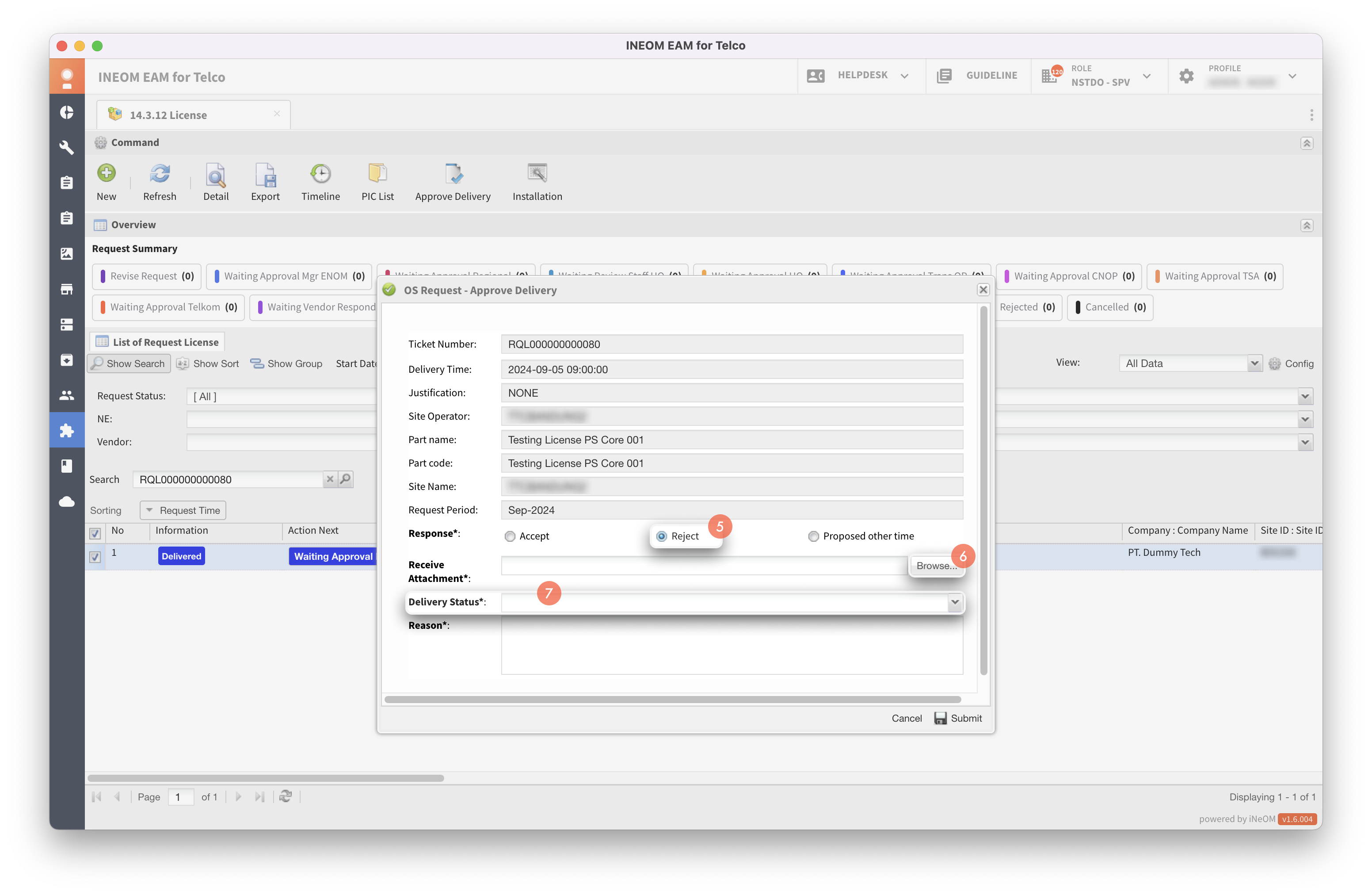
5. Klik radio button Reject.
6. Klik tombol **`Browse`** untuk mengunggah bukti penerimaan perangkat.
7. Pilih delivery status: DOA (Dead on Arrival) atau Wrong Sparepart.
8. Isi alasan.
9. Klik tombol **`Submit`**.
{% hint style="success" %}
Proses reject approval delivery oleh Requestor berhasil apabila status tiket menjadi **Waiting Vendor Respond**.
{% endhint %}
{% endtab %}
{% tab title="Proposed Other Time" %}
Proses proposed other time approval delivery:
1. Klik menu 14.3.12 License (eTSA Features).
2. Cari ticket number RQL.
3. Klik tiket.
4. Klik tombol **`Approve Delivery`**.
5. Klik radio button Proposed Other Time.
6. Pilih tanggal dan waktu penerimaan barang.
7. Klik tombol **`Browse`** untuk mengunggah bukti penerimaan perangkat.
8. Klik tombol **`Submit`**.
{% hint style="success" %}
Proses proposed other time approval delivery oleh Requestor berhasil apabila status tiket menjadi **Closed**.
{% endhint %}
{% endtab %}
{% endtabs %}