> For the complete documentation index, see [llms.txt](https://docs.ineom-tsel.mit.id/llms.txt). Markdown versions of documentation pages are available by appending `.md` to page URLs; this page is available as [Markdown](https://docs.ineom-tsel.mit.id/epro/toti-reconciliation/approval-by-to-nop.md).
# Approval by TO/NOP
{% hint style="info" %}
Proses approval oleh TO/NOP dilakukan pada tiket dengan status **Waiting TO/NOP Approval.**
{% endhint %}
{% tabs %}
{% tab title="Approve" %}
Proses approve:
1. Klik menu ePR (Electronic Tower Provider Reporting & Operations) pada side bar.
2. Klik menu 4.2 TOTI Reconciliation.
3. Pilih Cluster Area: Indonesia.
4. Cari ticket number.
5. Klik tiket.
6. Klik **`Approve`**.
7. Klik **`Approve`**.
{% endtab %}
{% tab title="Reject" %}
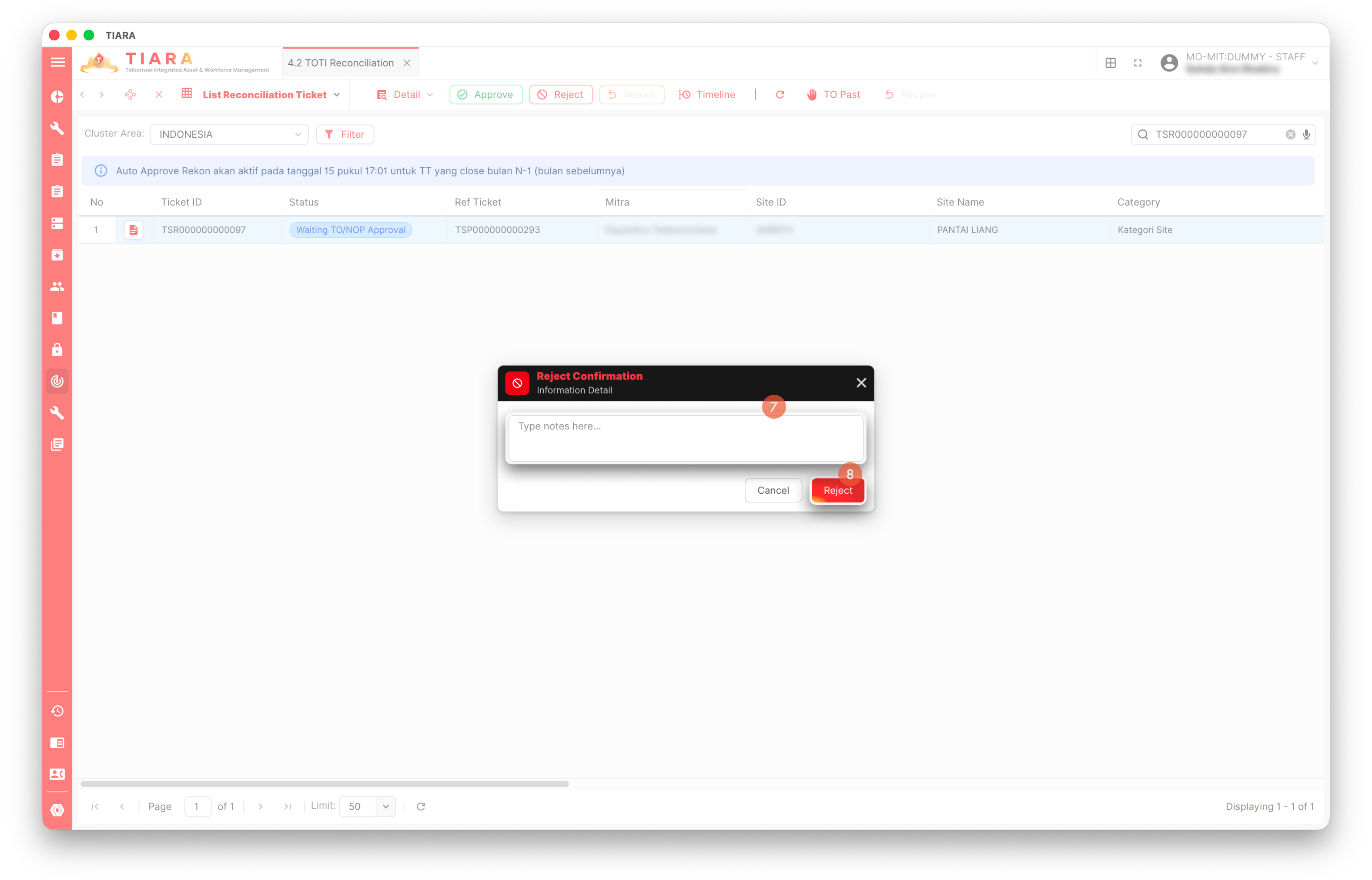
Proses reject:
1. Klik menu ePR (Electronic Tower Provider Reporting & Operations) pada side bar.
2. Klik menu 4.2 TOTI Reconciliation.
3. Pilih Cluster Area: Indonesia.
4. Cari ticket number.
5. Klik tiket.
6. Klik **`Reject`**.
7. Isi catatan dengan alasan melakukan reject.
8. Klik **`Reject`**.
{% endtab %}
{% tab title="TO Past" %}
Proses TO past:
1. Klik menu ePR (Electronic Tower Provider Reporting & Operations) pada side bar.
2. Klik menu 4.2 TOTI Reconciliation.
3. Pilih Cluster Area: Indonesia.
4. Cari ticket number.
5. Klik tiket.
6. Klik **`TO Past`**.
7. Klik **`TO Past`**.
{% endtab %}
{% endtabs %}
{% hint style="success" %}
Proses approve oleh TO berhasil apabila status tiket menjadi **Waiting NOS Approval**. Apabila dilakukan reject maka status tiket menjadi **Waiting Resubmission by TP.** Apabila dilakukan TO Past maka status tiket menjadi **Waiting NOS Approval.**
{% endhint %}




.png?alt=media&token=9debacde-c9cf-4416-940f-6453d9b88b04)
